I'M SEARCHING FOR MY FIRST ROUND OF BETA CLIENTS!
WANT TO BE INVOLVED?

WHY
WRITING
MATTERS
THE UNDERESTIMATED MARKETING EDGE THAT CATAPULTS ORDINARY TO OUTSTANDING
Consumers no longer buy impulsively.
They look for a bond first.
WRITING HOLDS THE POWER TO UNDISPUTED IMPACT.
THE MOST
UNDERRATED ASSET SETTING YOU APART FROM COMPETITORS
Picture your current marketing technique. You may have a detailed website with strong brand aesthetics, stunning photography, hooking social media content, and solid reviews.
But so do most other brands in business.
Standing out takes more, and what many lack offering is the exceptional. Details that entice and invite beyond the ordinary social media presence. A compelling insight that feels tailored and personal. Something to get as close to capturing a feeling in a bottle, and creating a way for potential clients to experience that for themselves.
It's also the key to becoming impactful, connective, and memorable in your niche... and creative writing is that edge.
Brands who consistently utilise storytelling in their marketing see higher engagement, increased consumer loyalty, & greater overall success.
WHY WRITING GIVES YOU THE ULTIMATE EDGE
THE PILLARS TO NURTURE AUDIENCES & CONNECT WITH CLIENTS
Detailed writing complements your current marketing, provides a deeper look into your products or services, and can become the needle to help move potential buyers from maybe to absolutely.
Creative and descriptive writing forges distinct brand identity and leadership, equips the visuals with depth, differentiates products or experiences to become standout, and offers compelling insight, inclusion, and in-depth information to clients — proven factors that drive trust, confident sales, and repeat brand loyalty.
Best of all, it's simple to apply, blends seamlessly with marketing you already use, and you're in complete control of what you choose to share.
YOU CAN TAILOR THE EXACT DEPTH THEY'VE BEEN LOOKING FOR.
WHAT STYLE OF WRITING SUITS MY BUSINESS?
Deciding on the perfect writing style to complement your brand doesn't have to be difficult, and it can already blend best with your natural momentum.
To remain on the more professional side and keep a gentle boundary, opt for staple, timeless pieces to remain on your website as evergreen content. Available throughout the seasons for passing traffic, they offer in-depth articles of curated topics and carefully crafted information. Classic.
If you prefer to extend friendliness and familiarity, a regular blog feels inclusive, refreshing, and invites engagement through hand-picked highlights with journalistic nature. This can be anything from articles that showcase useful information like best local beaches and seasonal weather insights, to personal stories and highlights of key occasions, interviews, or the house drink of the moment.
To balance the two approaches, pair core articles alongside a controlled, routine insight — think thoughtful newsletters, spotlights of special events and updates, or profile interviews with head staff. Professional, yet welcoming.
Eye-catching social media is an appealing appetiser in marketing.
But long-form writing is the nourishing main course with the unforgettable taste.
THE TRUE WINDOW TO THE SOUL OF YOUR BUSINESS.
YOUR CONTENT: TRANSFORMED & DEEPENED
Imagine the addition of descriptive, detailed writing that welcomes and nurtures audiences through inviting narratives — deeply showcasing the best of your brand, all while guiding traffic straight onto the pages of your own website.
Businesses that want to drive confident sales are now weaving the power of creative writing into their marketing strategies — specifically, psychology-backed methods that aim to evoke emotions and successfully nurture audiences towards sales.
Stories in themselves are 22 times more memorable than facts alone. Studies show that 62% of consumers have an emotional connection to the brands they buy from the most, and 55% of consumers who feel emotional connection and fully trust a brand will stay loyal to it.
And unbelievably, utilising stories in marketing can create such economic value in that it can increase perceived product value up to 2,706%.
Crafting content that's specifically designed to resonate and create a connection, brand writing is rapidly becoming one of the most worthwhile investments for impactful marketing.
Details are the ingredients to infuse emotion, depth, and insight to your business.
Details are the ingredients to infuse emotion, depth, and insight to your business.

you don't have to work alone...
let's compose resonant& impactful work together.
As an accredited journalist with an extensive background in writing, public speaking, and storytelling
plus almost a decade of experience in guest relations
within hospitality and luxury travel,
I understand the importance of communicating with purpose
and connecting deeply with an audience.
I'm here to be the meticulous partner dedicated
to helping you reach the right people, welcome more
revenue, & make meaningful difference
to your clientele's lives.


About your new Writer...
Francesca is a dedicated writer and publication expert with a Bachelor's degree in Journalism, extensive media experience, and over a decade in handling and sharing powerful stories.
Partnering with select clients to ensure high-quality editorial support and exceptional long-form results, Francesca transforms brand narratives into captivating nonfiction and timeless literature. Her talents include a commitment to professionalism, a strong understanding of people, and an insatiable interest in evocative writing and connective storytelling.
After graduating with Honors, she began honing her speciality in long-form narratives through her travels and career experience in hospitality. She continues her passions with connecting people to enriching experiences and reaching audiences through the written word.
Promising meaningful work crafted with precision and heart, Francesca ensures her writing weaves gripping narratives, compelling value, and emotive substance -- always with the aim to leave readers with a lasting impact.

Deepen your writing, and your connection with others will follow.
Want to learn how to make connective writing, create emotive storytelling,
and captivate target audiences, all with a journalistic twist?
Sign up to receive authentic content tips in a thoughtful email series straight to your inbox. From one human to another, no AI here!

5 Underrated Tips for SEO Fluency: How To Check Vital SEO for Starters
Starting my own business has definitely not been for the weak.
I know anyone in the trenches of entrepreneurship can tell you that... however it feels like a semi-unspoken rule about just how much you had to KNOW (and continue to find out) just to get successfully started.
If you've been to my blog before, you'll know I'm an accredited journalist and professional brand writer.
In my multimedia journalism degree, I was trained on everything to do with online, blogging, magazines, feature writing, design, article submission, webpage management.
But it's as if that entire course (supposedly heavily preparing you for the online sphere) was one SEO Power Hour and that was it. I knew what ALT text was, but as for anything else...?
Good luck in your independent role ten years later and looking it alllll up, finding it all out for yourself!
Anyway, that's why this very blog exists... it's taken me five months to figure out, and now it's here for you in five minutes.
The Quick, Efficient Checks
SEO (or search-engine optimisation) helps websites and data to understand what content you're producing, and in turn, direct traffic (people, audiences, readers) towards your pages.
When we start getting fancier with SEO, it gives you valuable analytics and statistics that are greatly important to have—especially when running a business.
It can indicate what traffic came from where, how frequently, what quantity, what geographical region, eeeverything.
Even how long they might have browsed your site, or how long it took for them to click one of your links/ buttons!
So naturally, it's extremely important to conduct 'Spring cleaning' checks, at least much more often than every Spring.
Here are the ones I can't operate or do business without now.
1. Easy Broken-Link Checker with Ahrefs
The first helpful resource I've found out about is running your website through a broken-link scanner to identify any dead commands.
It scans all your pages (soooo helpful if you've got many of them, saving you an endless amount of manual labour time poring over every single one) and double checks that it successfully leads to a destination without error.
If it flags that a link might be broken, it tells you which one (which is likely displaying your Error: 404 page), so you can head to sort this out immediately.
Imagine if there's an extremely important navigation somewhere on your website with a dead link.
A freebie link that leads nowhere.
Even worse, a link within a sale pipeline that could have been the key to someone reading more, buying, or booking!
Run your site through this tool, and know all your links are (a)live and happy.
As a triple-tip in one, there are also two other free features you can access from that same link with Ahrefs.
You can run your site through the Backlink Checker: a handy summary of links that show you which other websites reference, quote, or link back to any pages of yours (I reference this lightly again in tip number 3!).
The second is their Website 'Authority' Checker—moreso for more established websites as this can only grow with time, but handy to know of for the future nonetheless.
2. Block Yourself from Google Analytics
Have you been visiting your website often to check functionality and navigating around your links, blogs, and other destinations to gauge user experience for others?
Of course you have, you're a dedicated entrepreneur.
Well, Google is still tracking this 'traffic', not fully deciphering that it's not in fact new guests, it's just the host in the house.
Especially if you use different devices or log in from other destinations like your parents' house, library, or other public places when you view something on your site in passing, it's a sensible idea to take yourself out of the equation and let Google record stronger, more authentic data.
I was advised to use two quick methods: download this specific Chrome Extension to opt out of data being sent to Google Analytics (literally called, Google Analytics Opt-out), to also use alongside a second Chrome extension for extra protection, 'Block Yourself from Google Analytics'.
3. Ensure Your Redirects Are Active
You may need to dive into your own domain host for this one, but I'm glad realised early on about a suuuuper common SEO mistake that would make such a costly mistake later!!
Make sure you have a redirect set-up, meaning your website operates fully whether someone types in www.writtenbyfe.com to their search bar, or drops the www and types writtenbyfe.com.
It sounds simple, but just to reiterate, it needs to happen across your entire website (every page) and ALSO FOR YOUR BLOG.
My blog operates out of a subdomain, writtenbyfe.com/blog (or www.writtenbyfe.com/blog, hehe) and when I was using the free backlink checker mentioned in the previous SEO step, I noticed a website had quoted one of my blogs that I posted a few months back.
Yaaaaay, pop the champagne!!! That's SEO working exactly as it should (they were able to find my blog, then post about it to link even more people back to me and send traffic my way!)
Wrong.
And I'm glad I checked.
While my website writtenbyfe.com had redirects active, MY BLOG POSTS HAD THE 404 ERROR if the www. was dropped!
So that traffic (albeit minuscule at this point of my business journey, but traffic nonetheless) I assumed I was getting? Browsers would have clicked if they were interested just to be taken allllll the way to my error page.
Simply because the URL quoted was https://www.writtenbyfe.com/blog/post/example rather than https://writtenbyfe.com/blog/post/example.
Yup, that simple of an error.
Imagine that error if it's a link to a landing page of yours, your services, or a blog post that could have earned you the client.
So yes, food for thought, contact your domain host or log into your website domain settings to investigate your redirects and interchangeable setup regarding the www. prefix.

4. Put Yourself on the Map
Okay, now we get into the good (but harder) stuff.
One of the best and arguably most important SEO tricks to implement would be to Index your site, and submit your Sitemaps; in other words, ensuring you've both submitted curated your website pages (yep... every single individual one) to be prepped and primed for search engine visibility, and then their optimal search engine positioning.
So make sure you put yourself on the radar with Google!!!
This, and tip number 5 warrant logging into your Google Search Console (sign in to GSC here).
Two separate functions, but both important practices. I was wondering whether to use both, or one or the other, and the advice given was you have to have used both if you're a new start-up—it helps to create your visibility foundations, especially when there's less data available for you.
The quick comparison:
Indexing: This is ultimately requesting Google's overall permission to include the page in its index. Only indexed pages will appear in search results; everything else will be hidden or unavailable via search engines.
Sitemaps: An XML sitemap tells Google which pages you consider important, helping Google find content (and be in a position to push it better) that might otherwise be missed through the simpler, automated crawling.
In summary, Sitemaps aid in optimal discovery, and Indexing is whether they're even available or visible to search engines at all.
If you're wondering how or what any of this jargon even means, good thing I already made a super handy Indexing & Sitemaps walkthrough that details every single step, so you can make sure you're doing it right.
As a total beginner, you will start there first.
If you're already Indexed, you can skip most of the steps—but ensure you're up to date with your Sitemaps (if your domain host doesn't already push them automatically, that is).
FYI, the Indexing & Sitemap walkthrough doesn't have to just do with blogs... those steps are needed for every single page you want 'visible' via search engines and keyword searches—so it's an absolute must to understand their importance (and implement them!!)
5. Combine Indexing with Sitemaps
If you want to instruct Google to optimise pages of yours in search engines, you need to submit your Sitemaps. As mentioned in the previous step, by now you should have pasted your main website URL to Google ready to be indexed (and visible).
Unless told otherwise, Google simply won't offer most pages of your website automatically. Some domain hosts will generate them, but it's best to double check in Console.
If your domain doesn't take care of this for you, then a lot of people forget to submit Sitemaps especially every time you create a new website page or new blog post after Indexing (if hosting on your main website, of course)... so try to get into the habit.
New page, new sitemap.
Also note: Submitting a sitemap does not guarantee indexing, and ultimately, Google will still determine if a page is high-quality enough to be pushed.
Utilise both Indexing and Sitemap submissions if:
You have a new website: speeds up the visibility and discovery
You have a 'large' site (typically 500+ pages): helps to ensure all pages are found
You may have poor internal linking: helps to identify any orphan pages
If your site is rich in media: also helps to index images and videos
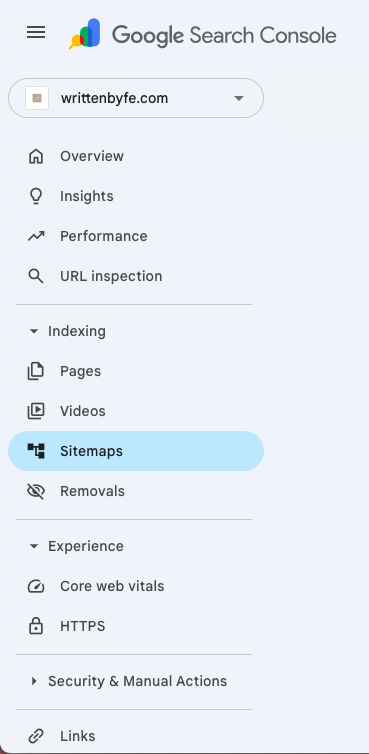
Recap: 🔎 In Google Search Console, head on over to the 'Sitemaps' tab, found in the left menu back in Google Search Console → type or cut/paste https://www.yourdomainhere.com/sitemap.xml (replace “yourdomainhere.com” with your real domain, of course). Submit.
Tip: You will NEED to add www. before your domain, or the SItemap submission will not work!
Remember: Check (and Resubmit) Indexing + Sitemaps with EVERY New Page
Just because you Index your website once, doesn't alwaysss mean it automatically continues with every new page you create (especially, not instantly). You may have a domain that helps push your sitemaps automatically, but it's best to check your status with Google Search Console every now and again to be sure.
You will mostly need to do this manually, especially each time you create a new website page (or blogpost, if you're hosting on your own domain!)
You can check easily if certain pages are Indexed at any time, using the 'Inspect URL' tab at the top of Google Search Console.
To successfully submit any new pages:
Re-open your Google Search Console.
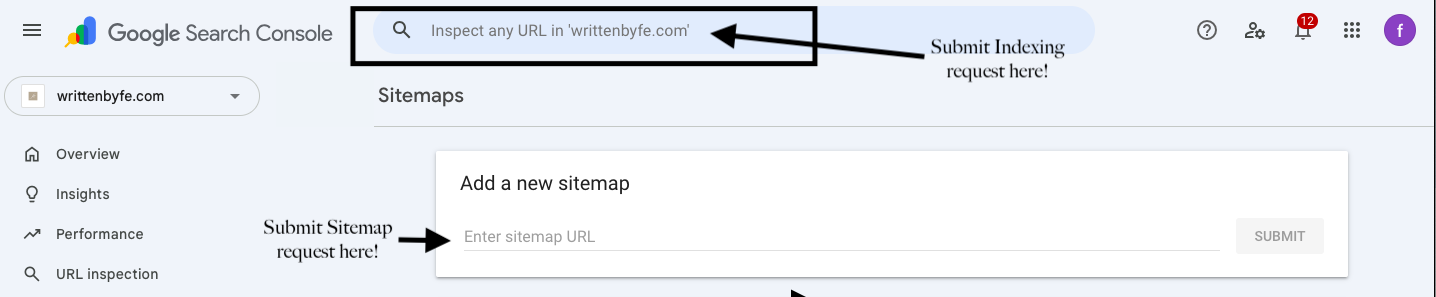
Once you've submitted the URL you want to check in the top box, press enter on your keyboard, and a current status for that page will show.
If it is successfully indexed, it will appear in green to confirm. Yay!
If your page is not successfully indexed, you will be told 'URL is not on Google' in grey, and the screen will look something like this.
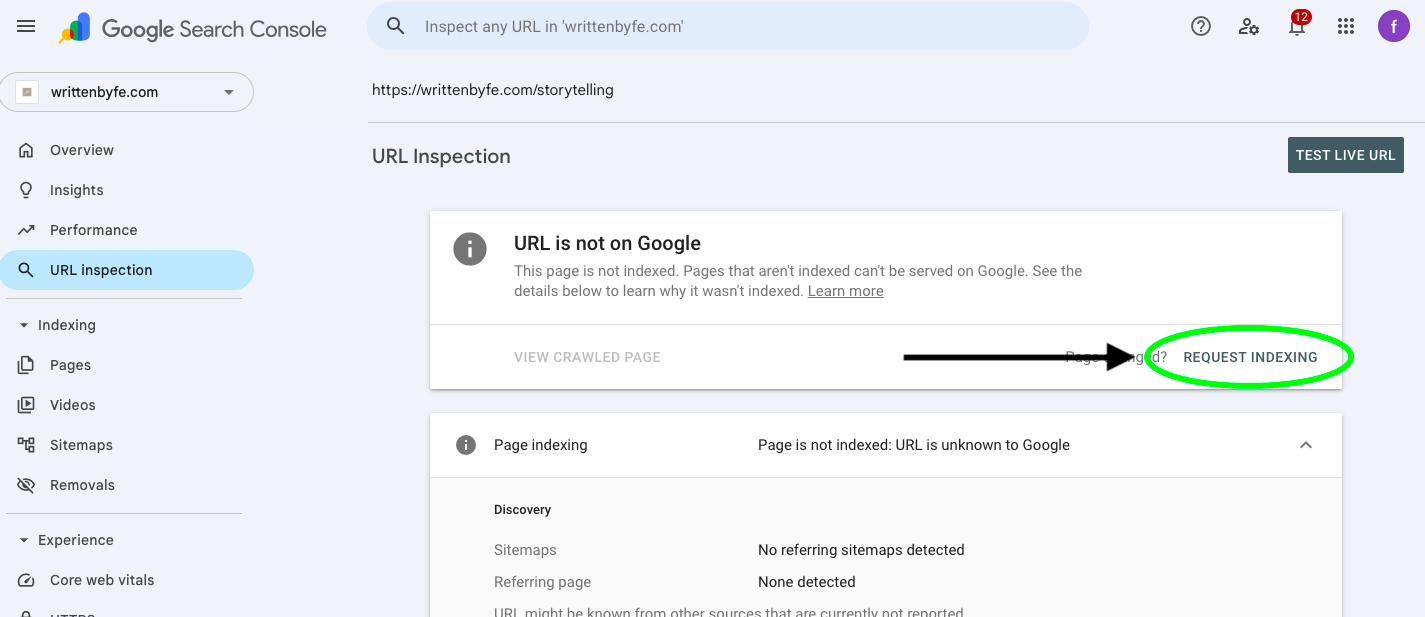
Notice you have a discovery notification underneath that lets you know, 'No referring Sitemaps detected'. Go to submit your Sitemaps (again found in the previously mentioned walkthrough, by adding /sitemaps.xml to the URL).
You can then press Request Indexing, seen within the green circle of the screenshot.
Google will start submitting for that exact page, and green notification will appear after a few seconds confirming it's in the queue!
Note: Google can take anywhere from a few days to a few weeks to process Indexing.
Rinse and repeat with any other pages that may need attention, and once successfully indexed, don't touch them again. Your valuable data collections will be compromised if you keep interfering!
Handy tip to view Indexing without logging into Google Search Console
One final, easy tip to view your current Indexing (without logging into GSC), is by typing a code into your main Google searchbar and seeing what comes up!
Go to www.google.com, or type into your overhead navigation bar
Search: siteurl:(www.yourdomainURLhere)
If you have any pages Indexed, they will show up in a list here
Phew, thank you for reading and learning these underrated-but-vital SEO tips along with me.
If you're a brand new entrepreneur or business owner (or just a blog writer hoping to become seen!) I'd love to connect on socials, find me at @writtenbyfe.
Keep carving your entrepreneurial pathway,
-fe